

How to Check UAE Visa Status Online: 2025 Step-by-Step Guide
Living or working in the UAE? Whether you’re on an employment visa, dependent visa, or investor visa—knowing your visa status is essential. Fortunately, the UAE government offers quick and easy online platforms to check the validity, expiry date, and status of your visa. In this guide, we’ll walk you through all the official methods available in 2025, including ICP and GDRFA portals, so you can stay updated in just a few clicks.
Table of Contents
Different Methods to Check UAE Visa Status
There are multiple official platforms you can use to check your UAE visa status online, depending on your emirate:
- ICP Smart Services – For visas from Abu Dhabi, Sharjah, Ajman, Fujairah, Umm Al Quwain, and Ras Al Khaimah
- GDRFA Portal – For Dubai-issued visas
- Emirates ID Portal – For ID card and visa application tracking
Method 1: Using ICP Smart Services
The ICP (Federal Authority for Identity, Citizenship, Customs & Port Security) allows you to check your visa validity status for most emirates online.
🔗 Official Link: ICP – Visa Validity Checker (All Emirates except Dubai)
Steps:
- Visit the ICP Smart Services page
- Select “Passport Information”
- Choose “Visa” or “Residency”
- Enter your passport number and passport expiry date
- Select your nationality
- Complete the CAPTCHA and click “Search”
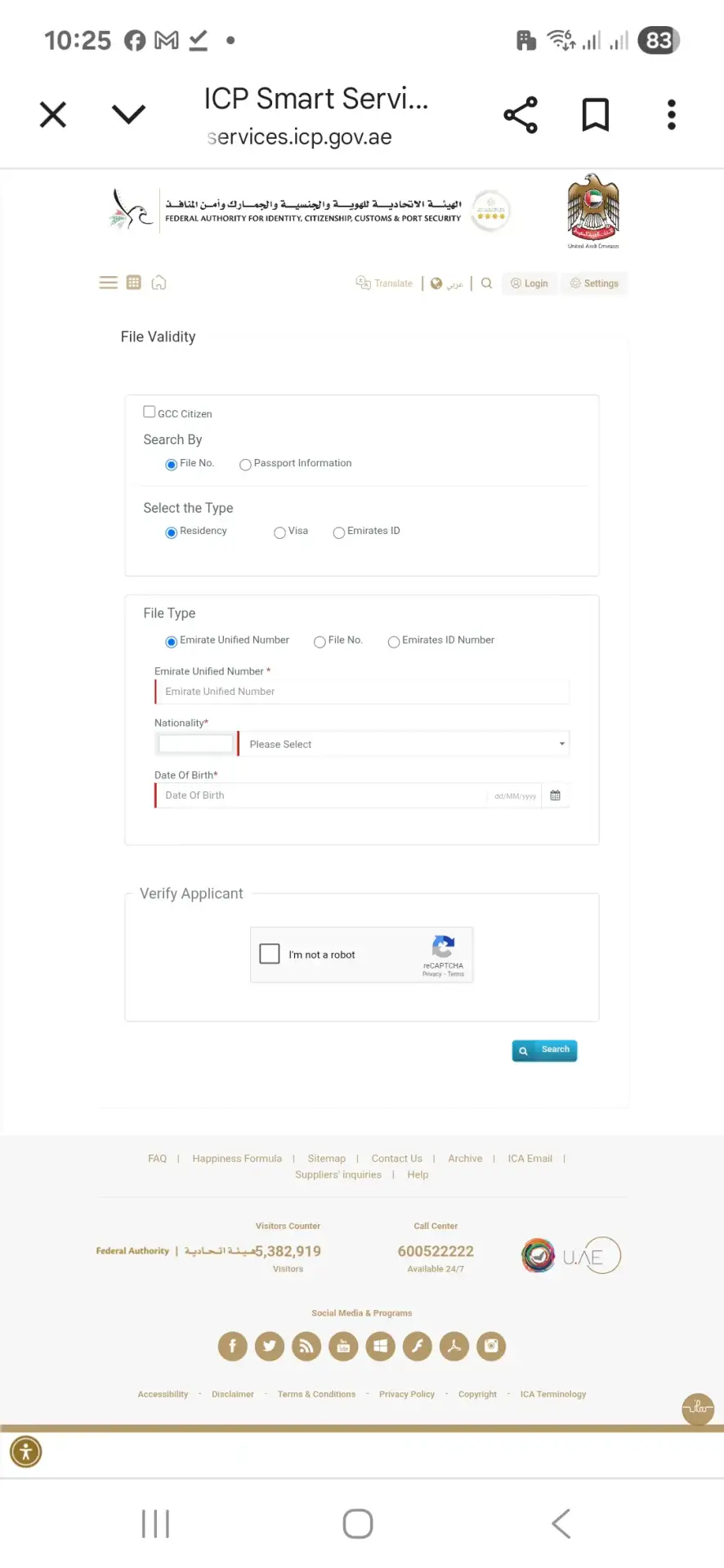
✅ You will see details such as:
- Visa status (Active/Expired)
- Visa number
- Expiry date
- Visa type
Method 2: For Dubai Visa (GDRFA Portal)
If your UAE visa was issued in Dubai, use the GDRFA website.
🔗 Official Link: Check Visa Status – GDRFA Dubai
Steps:
- Go to the GDRFA portal
- Click on “Residency Services” or directly access the visa status page
- Enter your residency file number (written on your visa)
- Provide date of birth and nationality
- Click “Submit” to see your visa status
This method will show:
- Visa validity
- Expiry date
- Status (Active/Canceled)
- Visa type and file number
Check Emirates ID Status (Bonus Tip)
If your visa is in process, you can track it through your Emirates ID application status.
🔗 Emirates ID Portal: Track Emirates ID Application – ICP Portal
Steps:
- Enter your application number or Emirates ID number
- Click on “Track”
You’ll see updates like:
- “Printing completed”
- “Card under processing”
- “Ready for delivery”
How to Know Your Visa Expiry Date
You can find your UAE visa expiry date in these ways:
- Online via ICP or GDRFA as shown above
- Printed inside your passport (residency sticker)
- Check your Emirates ID expiry — usually linked to visa
Grace Period After Expiry:
After your visa expires, you usually get a 30-day grace period. If you don’t renew or exit within this time, you may face fines.
Fines:
- AED 50 per day for overstaying
- Additional administrative charges
Frequently Asked Questions
1. Can I check UAE visa status without passport number?
No, a passport number or file number is required to check visa status online.
2. What is the difference between ICP and GDRFA?
ICP covers all emirates except Dubai. GDRFA is specifically for Dubai-issued visas.
3. Can I use a mobile app to check visa status?
Yes, both ICP and GDRFA have mobile apps available on Android and iOS for checking visa and Emirates ID status.
4. My visa shows “cancelled” — what does that mean?
It means your residency has been legally terminated. You must either leave the country or apply for a new visa.
5. Can typing centers check my visa status?
Yes, authorized typing centers in UAE can access your visa info with your documents.
Final Thoughts
Checking your UAE visa status online is now simple and secure, thanks to the official digital platforms provided by the government. Whether you’re renewing your visa, applying for Emirates ID, or planning travel, staying informed about your visa validity is essential. Use the ICP or GDRFA websites, depending on your visa type, and track your status in under 5 minutes.
For more guides related to living and working in the UAE, explore other posts on Woorely.com:


Pingback: Complete Tutorial: Register C3Pay with ATM Card & View ATM PIN(2025)
Pingback: How to Create UAE PASS in 2025 [Complete Step-by-Step Guide]